Stick to your trading rules
An automatic journal and discipline alerts for your MT5 account. TradeCalmly reads your trades with the investor password and tells you when a loss hits your limit, and when a profit reaches your target.
Free while in testing. Coming soon to Google Play and the App Store.
- Read-only
- An investor password cannot place orders
- 6 rules
- Thresholds you set
- Push and Telegram
- Alerts even when the app is closed
21:10
Tuesday, 30 December

Daily target reached +3.04% (+$152.00)
📌 “Bulls make money, bears make money, pigs get slaughtered.” — Wall Street saying
XAUUSD BUY 0.10 risks 2.40% of equity, above the 2% limit
📌 “By risking 1%, I am indifferent to any individual trade.” — Larry Hite
You have lost 3 trades in a row. Take a break before trading again.
📌 “If most traders would learn to sit on their hands 50 percent of the time, they would make a lot more money.” — Bill Lipschutz
Six rules, your thresholds
Discipline works both ways: stop when a loss hits your limit, and know when a profit has reached your target. Each rule tells you once per threshold, on the channels you pick, with a reminder line. The lines below are the defaults; you can write your own. Alerts state the numbers and never suggest buying or selling.
- Daily Loss Limit
- The day's loss against day-start equity, open trades included. Told at 80% and 100%.
- Limit hit. Trying to win it back on tilt is the shortest way to blow the account.
- 5%
- Pass Target
- Closed profit in the day, week or month.
- “Bulls make money, bears make money, pigs get slaughtered.” — Wall Street saying
- +3%
- Losing Streak
- Losing trades in a row.
- “If most traders would learn to sit on their hands 50 percent of the time, they would make a lot more money.” — Bill Lipschutz
- 3 trades
- Overtrading
- Trades opened in one day.
- “The desire for constant action irrespective of underlying conditions is responsible for many losses in Wall Street.” — Jesse Livermore
- 10 trades
- Risk per Trade
- Risk to the SL against equity.
- “By risking 1%, I am indifferent to any individual trade.” — Larry Hite
- 2%
- Max Margin Usage
- Margin in use against equity.
- “If you don't bet, you can't win. If you lose all your chips, you can't bet.” — Larry Hite
- 20%
The numbers on the right are examples. There are also alerts for drawdown, trades without SL/TP, SL/TP hits, session openings and daily and weekly reports.
One day, two paths
A $5,000 account, daily target +3% ($150), loss limit 5% ($250). At 17:26 the profit reaches the target and the app says so. Stopping or trading on is your call; the app only shows the numbers.

- 15:05, XAUUSD buy 0.03 lots: +$46.20, day +$46.20
- 15:48, XAUUSD sell 0.03 lots: +$31.50, day +$77.70
- 16:30, EURUSD buy 0.10 lots: +$22.00, day +$99.70
- 17:26, XAUUSD buy 0.05 lots: +$54.80, day +$154.50 Pass target: Daily target reached +3.09% (+$154.50)
- 18:10, XAUUSD sell 0.05 lots: −$45.30, day +$109.20
- 19:02, XAUUSD buy 0.08 lots: −$76.10, day +$33.10
- 19:44, XAUUSD sell 0.08 lots: −$61.40, day −$28.30 Losing streak: You have lost 3 trades in a row.
- 20:15, XAUUSD buy 0.10 lots: −$118.60, day −$146.90
- 21:32, XAUUSD buy 0.10 lots: −$68.80, day −$215.70 Daily loss limit: Today's loss −4.31%, 86% of the daily limit used ($250.00)
- 21:58, XAUUSD sell 0.10 lots: −$83.10, day −$298.80 Overtrading: You have opened 10 trades today, reaching the 10 trades/day limit Daily loss limit: Today's loss −5.98%, daily limit reached ($250.00)
Open the app, the numbers are there
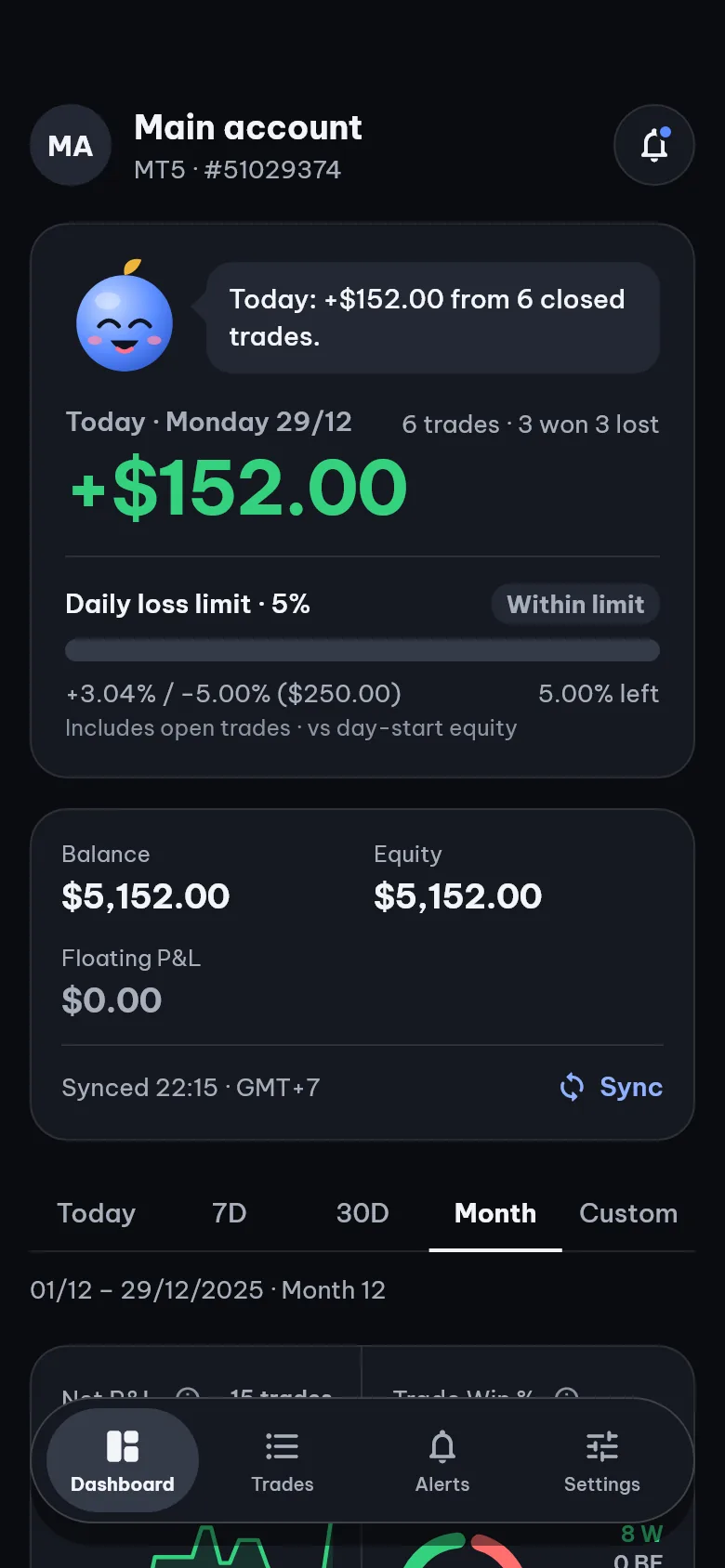
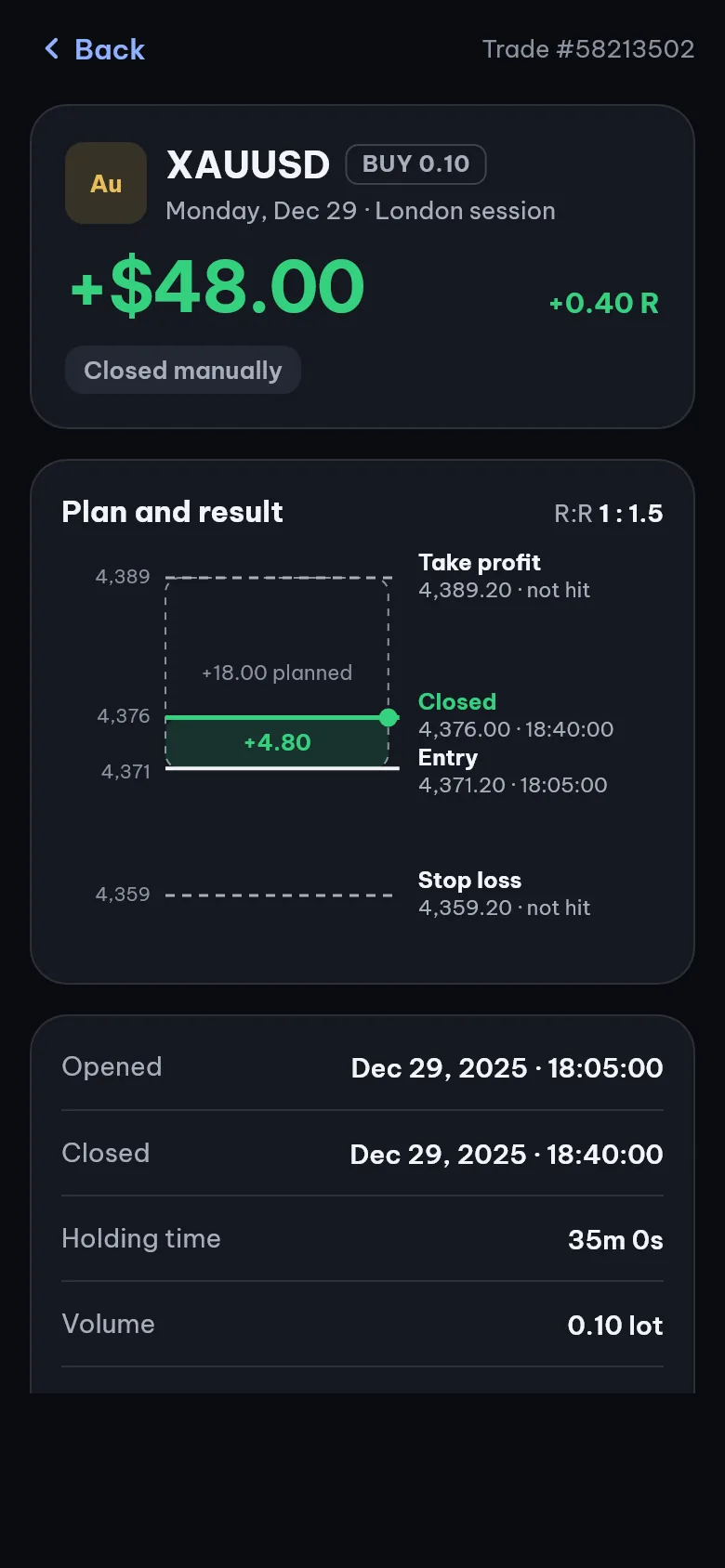
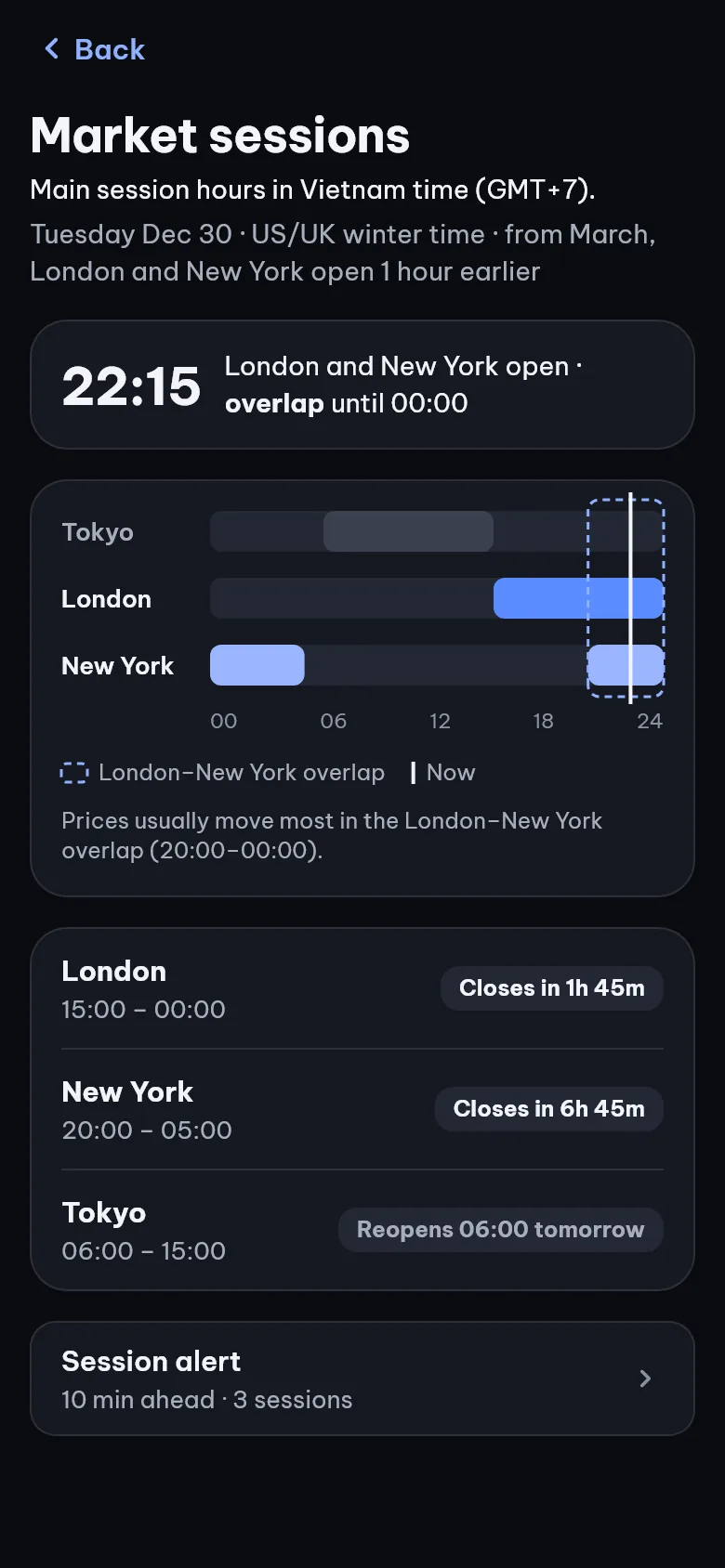
Every trade lands in your journal on its own, nothing to type. A position closed in parts is still one trade. Every time is in the zone you pick, GMT+7 by default.
Up and running in minutes
- Sign upWith your email, in the app.
- Connect MT5Pick your broker and server, enter the account number and the investor password.
- Turn on your rulesThe app loads 90 days of history, then syncs itself and tells you when a threshold is hit.
Where do I get the investor password?
- From your broker: check the account opening email or your broker's client area. Prop firms (FTMO, FundedNext…) usually show it with the login details.
- MT5 app on your phone: menu ☰ › Manage accounts, tap ⋮ on the account, choose Change password, then the investor password.
- MT5 on a computer: Tools › Options › Server › Change, choose Change investor (read only) password.
Setting a new one (ways 2 and 3) needs your current main password. The investor password can only view: it cannot open or close trades.
Brokers
Tested with Exness and Vantage (October 2026). Other MT5 brokers: pick your server in the app; if it is not there yet, the app files a request and emails you once it is added.
Safe from the first login
Read-only.
The investor password only sees trades and balance. A password with trading rights is turned away as you connect.
No orders, no money held.
Your money stays with your broker. The app never opens or closes trades, never suggests buying or selling, and does not sell your data.
Your data, your call.
Disconnect and the investor password is deleted at once. Delete your account in the app and all your data goes. See the privacy policy and how to delete your account.
FAQ
Does it cost anything?
It is free while in testing. If a paid plan comes later, you will be told in advance.
What is an investor password?
The view-only password of an MT5 account: it logs in and sees trades and balance, but cannot open or close trades. Your broker may have sent it in the account opening email; if not, set it in the MT5 app on your phone or on a computer (see Get started).
Does TradeCalmly trade or give signals?
No. The app never places orders and never suggests buying or selling. Alerts only report numbers against the rules you set.
What is the reminder line in an alert?
Each discipline rule adds a reminder at the end of its alert, by default a line from a well-known trader. Write your own or switch it off in the alert's settings.
Which brokers work?
Tested with Exness and Vantage. Other MT5 brokers: if your server is not on the list yet, the app files a request and emails you once it is added.
I use MT4 or cTrader. What about me?
For now the app connects MT5 accounts only. Other platforms will follow demand: tell us which one you use in the Telegram group.
Is there an app for iPhone and Android?
Yes, for both iOS and Android, in English and Vietnamese, with a dark mode. It is coming soon to Google Play and the App Store; to try it early, join the Telegram group.
How many MT5 accounts can I follow?
One MT5 account for now. You can remove it and connect another one at any time.
How do I delete my data?
In the app: Settings › Delete account. See also how to delete your account.
I have another question
Ask in the Telegram group; the people who make the app answer there.
“Rule No. 1: Never lose money. Rule No. 2: Never forget rule No. 1.” — Warren Buffett
Rules, with numbers
Join the Telegram group to try the app before it reaches Google Play and the App Store, and to talk to the people who make it.
Join on Telegram